Skip to content

Fleet visibility and control

Run your rental business with clear oversight of assets, schedules, and performance

Resvo connects asset structure, investor ownership and payouts, usage programs, rental scheduling, fleet pressure, and operational reporting so managers can see what is happening now and what is changing over time.

  • See fleet composition and branch distribution in a structured model.
  • Connect investor-owned vehicles to performance, revenue-share terms, and payout status.
  • Track how vehicles are deployed through defined usage programs.
  • See pressure from demand, readiness, schedule conflicts, and utilization in one control layer.
Fleet manager viewing fleet lot
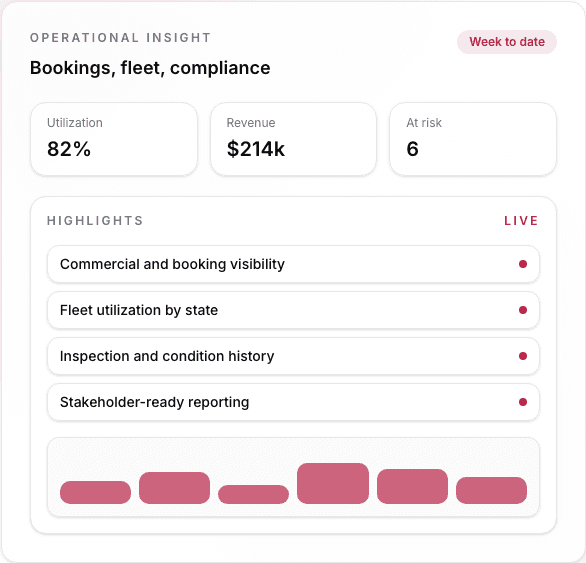
Asset distribution by category and branchInvestor ownership, performance, and settlement stateProgram-level utilization and assignment patterns

Suggested 90-day KPI targets

Visibility and control outcomes teams can measure in the first 90 days

100%

Asset classification coverage

Vehicles are organized in meaningful categories that match operational reality.

90%+

Program assignment coverage

Vehicle usage is tracked through defined programs instead of informal labels.

<30 min

Daily cross-team scheduling alignment

Teams coordinate major rental and operational events faster from one scheduler.

Daily

Fleet pressure review

Managers review demand, readiness, conflicts, and utilization pressure before the day runs away.

<24 hrs

Manager reporting turnaround

Personalized reports surface fresh performance signals for decision-making.

Capabilities that make Visibility & Control easier to manage

Each capability strengthens oversight, planning, and decision quality across the rental business.

AI Co-Pilot

Live

Ask about the whole rental business without rebuilding the answer

Introduction

AI Co-Pilot works across Resvo rather than inside one department. Managers can ask about bookings, customers, fleet, payments, utilization, and performance; the Co-Pilot gathers the relevant operating context, answers with supporting evidence, summarizes what changed, and recommends the next action.

What it solves

Management questions take too long to answer when the team has to reconstruct the situation across reports, booking records, messages, and branch updates.

Outcomes and impact

A cross-platform question surface shortens the path from operating signal to management understanding while leaving the final decision with the operator.
AI Co-Pilot answering a management question with connected rental context in Resvo

Cross-platform

Management question surface

Booking, fleet, customer, payment, and performance context can contribute to one evidence-backed answer.

  • The operator asks a business question in plain language.
  • The answer draws from the relevant Resvo records and shows the supporting context.
  • Recommended next steps remain visible for the operator to accept, edit, or ignore.
Asset Control

Understand fleet structure clearly across categories and branches

Introduction

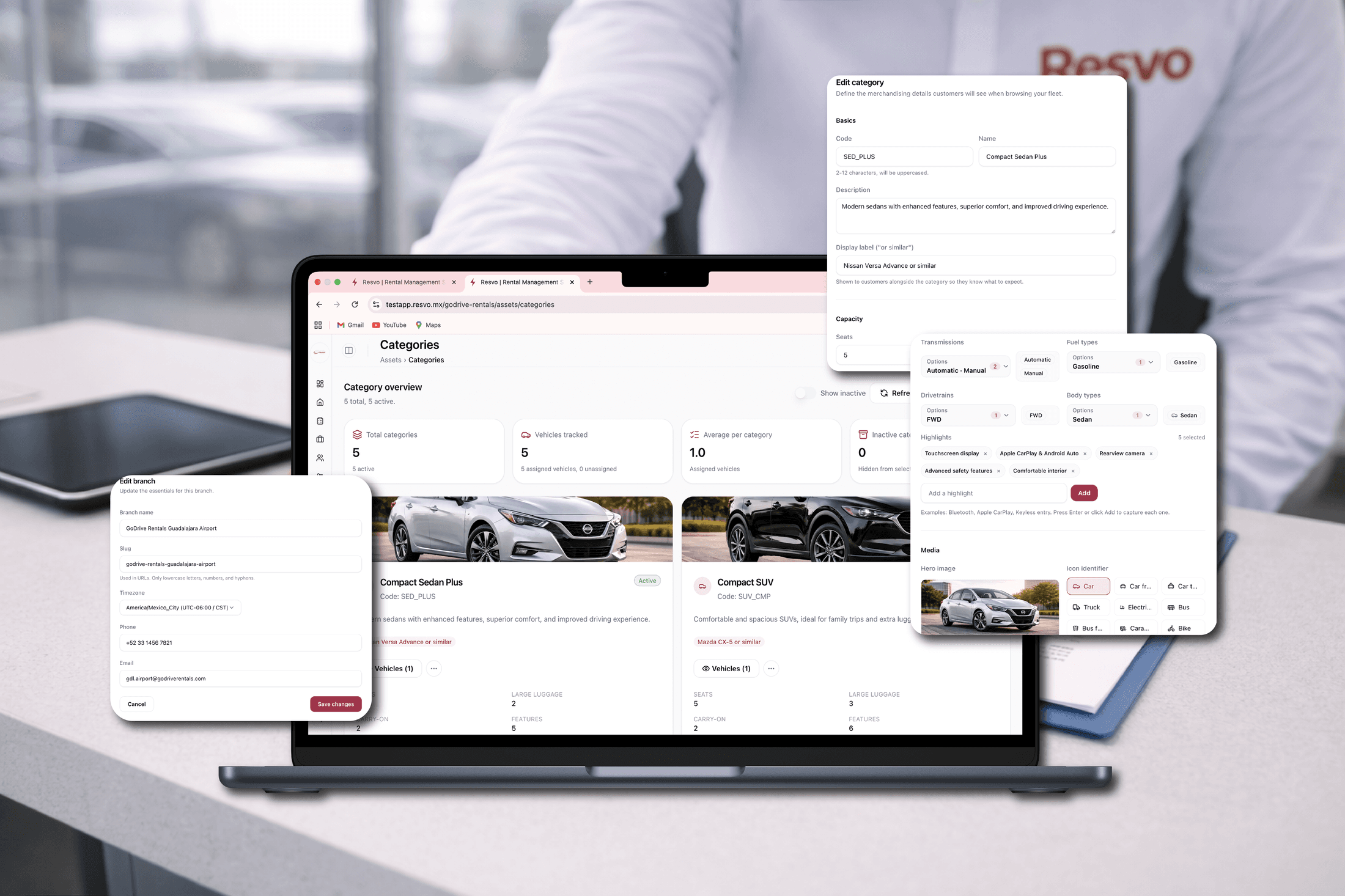
Asset Control lets teams classify vehicles into useful categories and assign them to the branches where they operate. This structure reflects real fleet organization and creates a reliable base for analysis, planning, and control decisions.

What it solves

Inconsistent fleet taxonomy across branches weakens reporting quality and makes planning decisions harder to trust.

Outcomes and impact

One asset model improves cross-branch visibility and gives leadership a dependable base for allocation decisions.

Asset Control view with vehicle categories, branch assignment, and fleet structure in Resvo

100%

Asset classification coverage

Managers gain a complete structural view of fleet composition, category mix, and branch distribution.

  • Fleet categories and branch assignments remain visible in one structured control view.
  • Vehicle-level attributes roll up into meaningful category and branch insights.
  • The same asset model feeds scheduling, program tracking, and reporting.

Fleet Investor Management

Live

Connect vehicle ownership, investor profitability, and payouts

Introduction

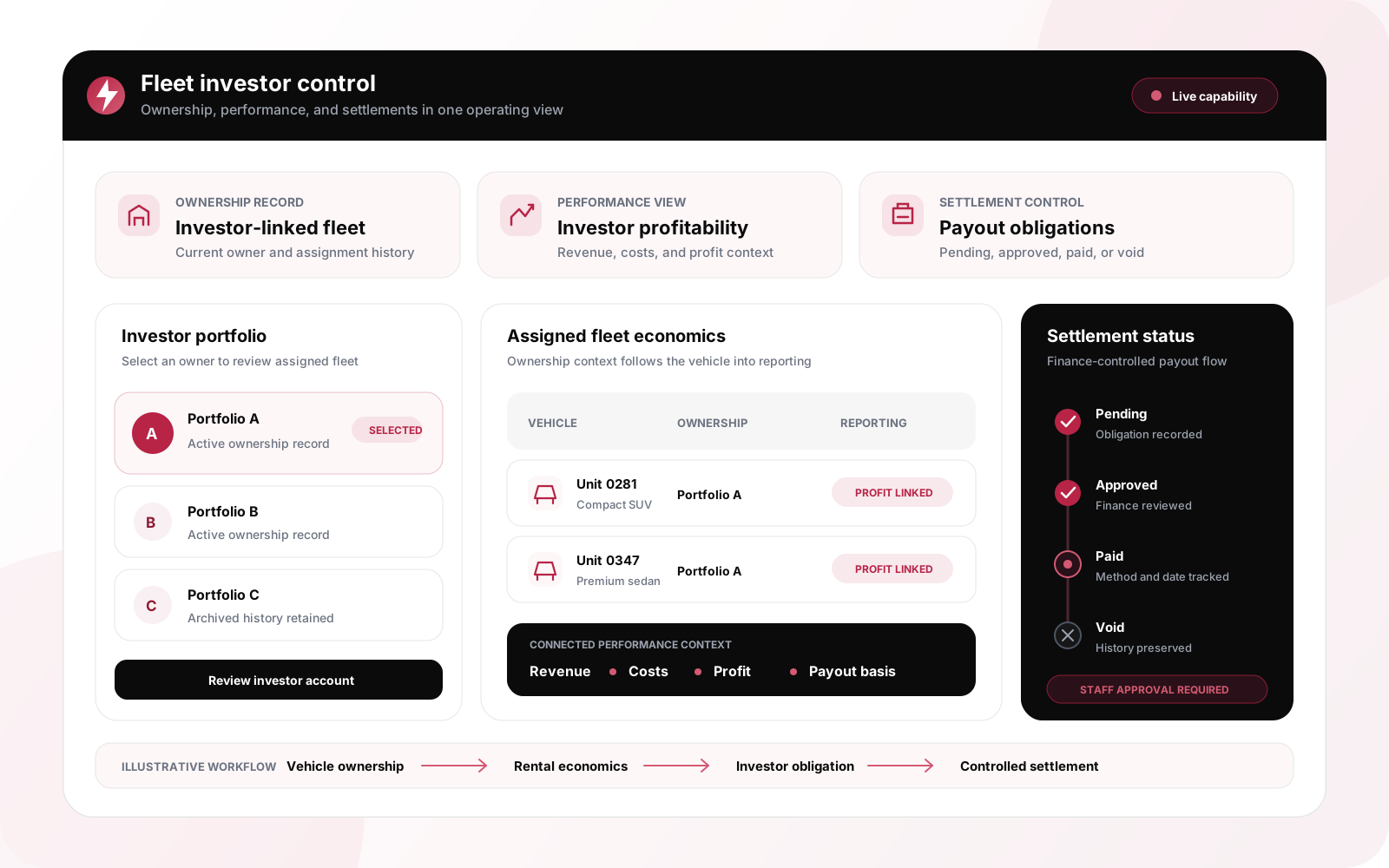
Create an investor record, assign one or more vehicles, preserve ownership history, and review the revenue, costs, profit, and payout obligations tied to that investor. Resvo also stores settlement cycles, revenue-share terms, and payout instructions so fleet and finance work from the same ownership context.

What it solves

Investor-owned fleets become difficult to manage when vehicle ownership lives in one spreadsheet, profitability in another report, and payouts in messages or manual notes.

Outcomes and impact

One ownership model makes investor performance easier to review and gives finance a traceable path from obligation to approval and paid status.

Illustrated Fleet Investor Management control view connecting vehicle ownership, profitability, and payout status in Resvo

4 states

Payout tracking

Pending, approved, paid, and void obligations stay tied to the investor and the supporting vehicle, booking, or reporting period.

  • Each vehicle carries its current investor ownership and assignment history.
  • Investor context connects assigned-fleet revenue, costs, and profit for performance review.
  • Finance tracks investor obligations and Partner commissions in one settlement queue without confusing ownership with booking source.

Usage Programs

Track how vehicles are deployed through structured usage programs

Introduction

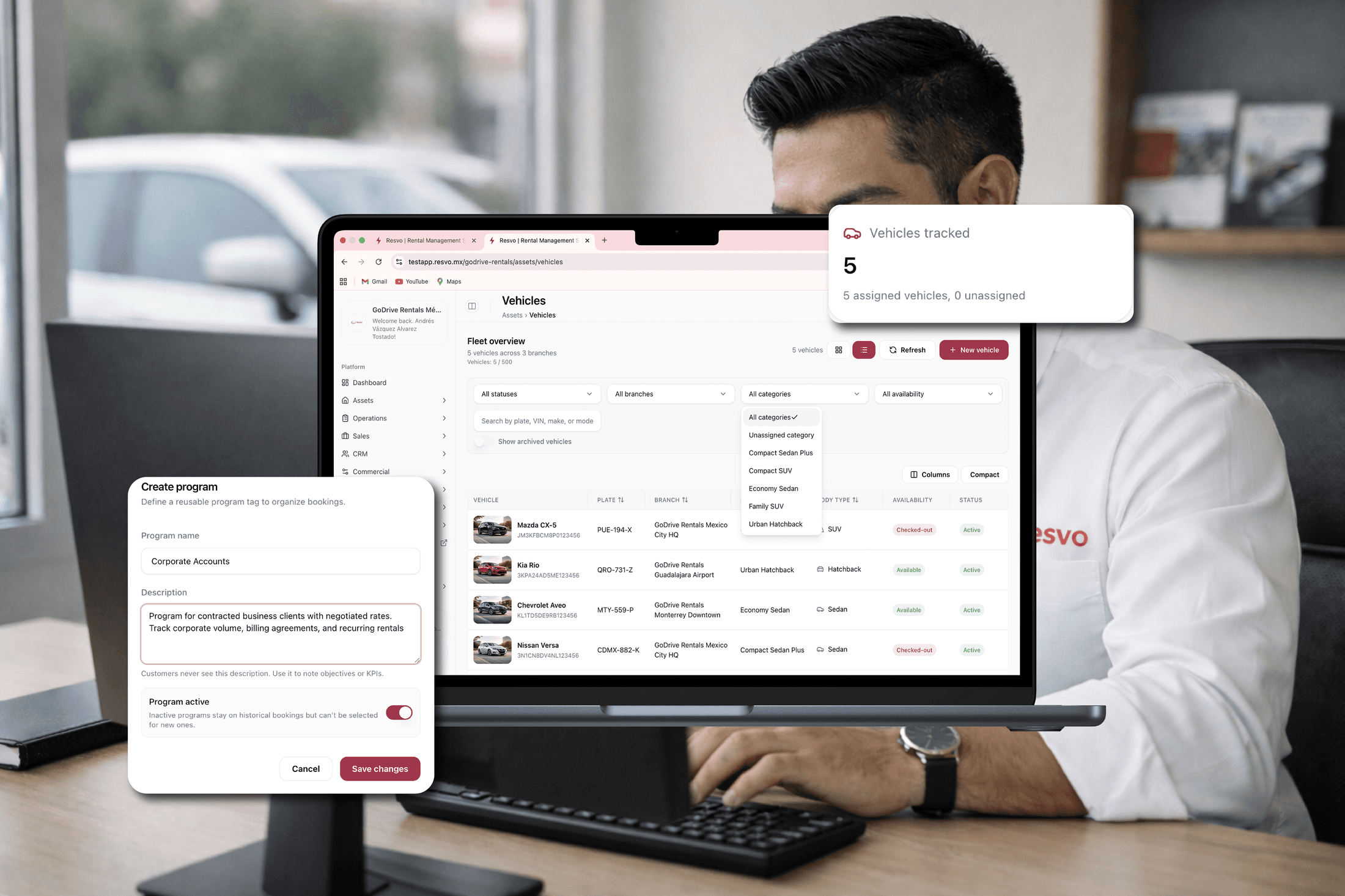
Usage Programs define and monitor how vehicles are used across different operational use cases. Teams can segment deployment patterns, compare program performance, and keep oversight on whether assets are being used as intended.

What it solves

Without clear program assignment, utilization quality stays opaque and corrective actions arrive too late.

Outcomes and impact

Program-level visibility improves deployment discipline and helps teams optimize utilization by use case.

Usage Programs dashboard showing segmented vehicle deployment and program oversight in Resvo

90%+

Program assignment coverage

Vehicle deployment is tracked by program with clearer visibility into how assets are being utilized.

  • Program-level assignment and utilization patterns are visible across the fleet.
  • Teams can compare how different programs consume and rotate assets.
  • Program context remains connected to scheduler timelines and reporting outputs.

Advanced Scheduler

Coordinate rentals and operational events from one advanced scheduler

Introduction

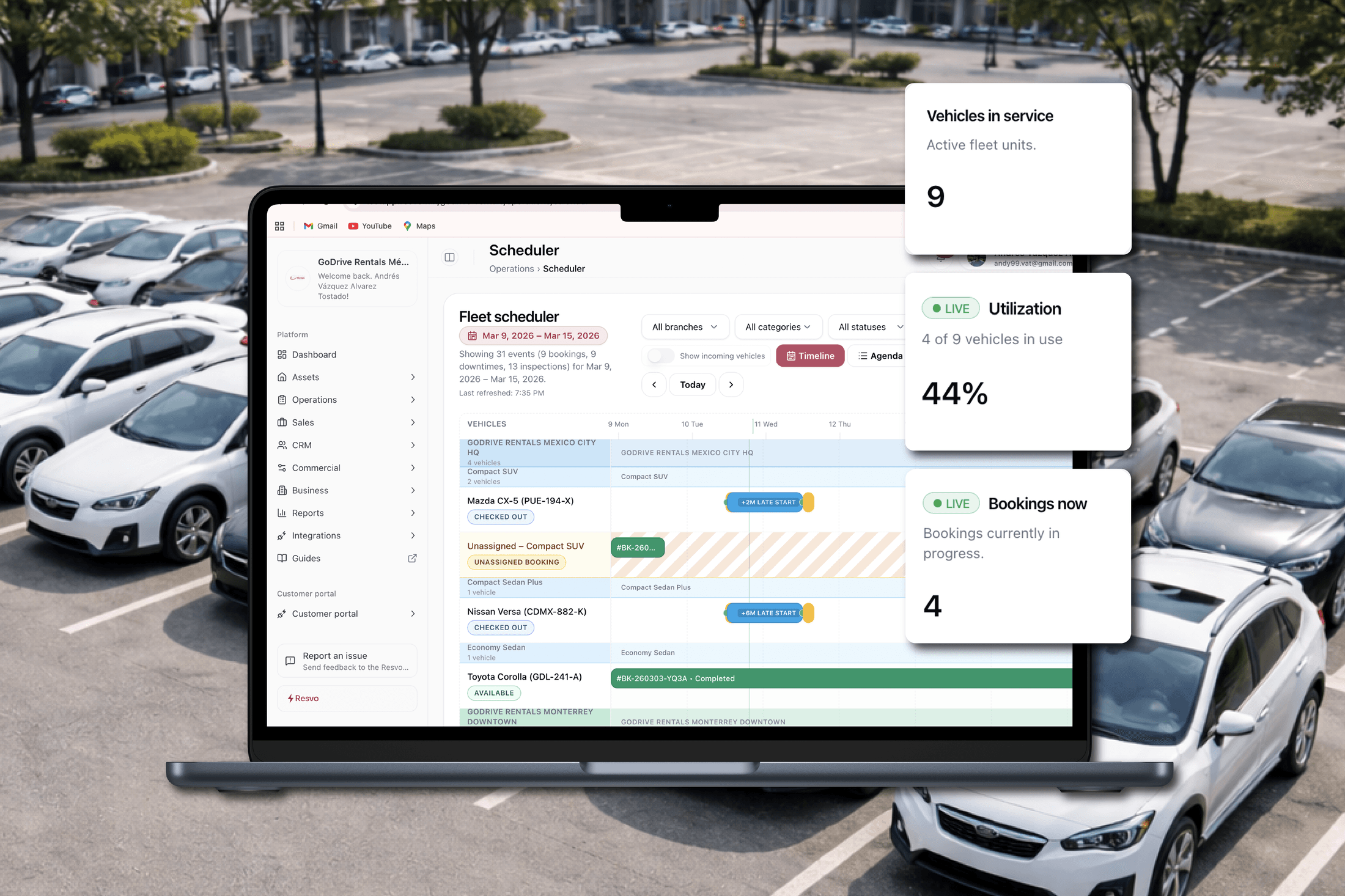
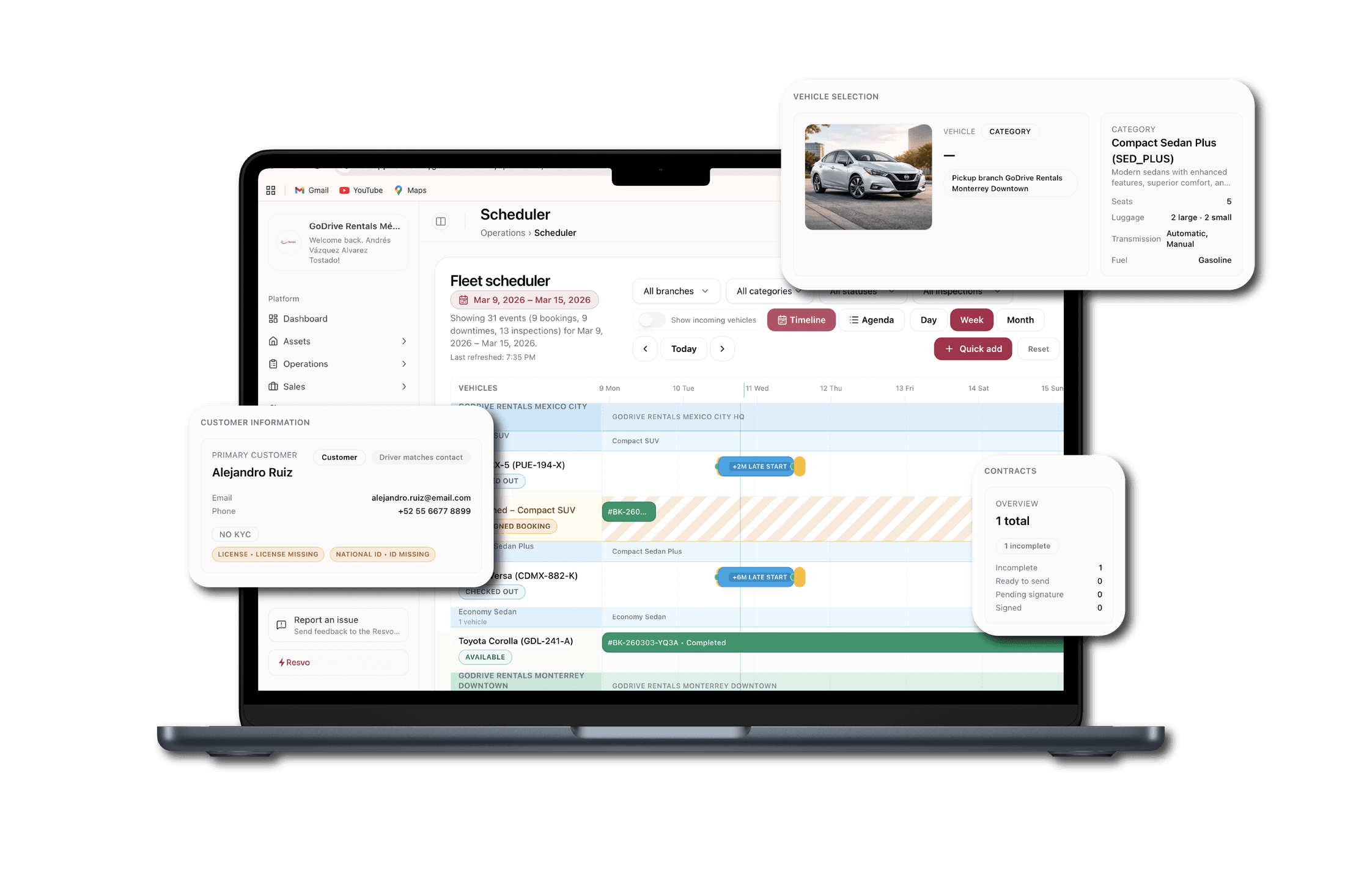
Advanced Scheduler provides one timeline for rentals, maintenance, branch movements, inspections, and internal operational tasks. Teams can sequence people, vehicles, and time with fewer conflicts and stronger cross-team alignment.

What it solves

Department-level scheduling silos create overlap conflicts, idle assets, and late operational re-planning.

Outcomes and impact

A shared timeline reduces collisions, improves daily readiness, and keeps multi-team execution aligned.

Advanced Scheduler timeline with rentals, maintenance, inspections, and movements in Resvo

<30 min

Daily scheduling alignment cycle

Teams typically align major daily events faster when all scheduled activity is visible in one place.

  • Rental and operational events remain visible in one multi-department timeline.
  • Dependencies and overlaps are easier to resolve before they become disruptions.
  • Scheduler decisions stay linked to asset and program context in the same platform.

Fleet Pressure

See demand and readiness pressure before it becomes disruption

Introduction

Fleet Pressure brings demand, availability, readiness, utilization, and schedule conflict signals into one management view. Leaders can see which branches, categories, or time windows are tightening before the team starts improvising.

What it solves

Managers often see pressure too late when demand, maintenance, movements, and returns are reviewed in separate tools.

Outcomes and impact

Earlier pressure visibility improves allocation decisions, protects readiness, and helps teams respond before utilization stress turns into customer-facing disruption.

Fleet pressure view using scheduler and availability context in Resvo

Daily

Pressure review cadence

Fleet pressure is designed for daily manager review across demand, readiness, utilization, and schedule conflicts.

  • Managers review demand and readiness pressure by branch, category, and time window.
  • Schedule conflicts and utilization pressure are surfaced before they create operational surprises.
  • Pressure signals feed planning decisions without changing bookings or pricing automatically.

Advanced Reporting

Turn operational activity into decision-ready performance reporting

Introduction

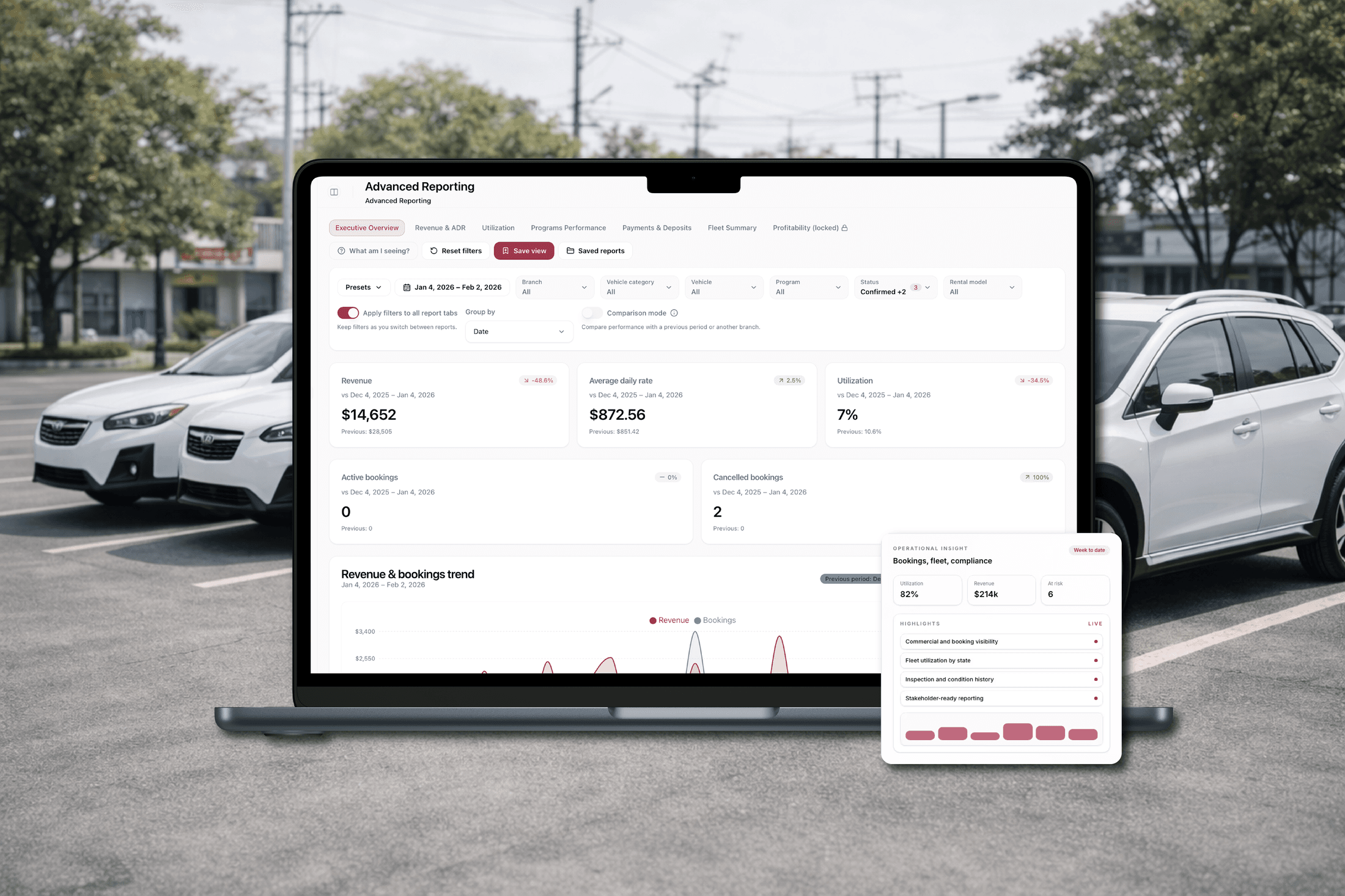
Advanced Reporting lets teams generate personalized reports from operational activity, utilization, scheduling, and program behavior. Managers move from assumptions to evidence when evaluating performance, planning adjustments, and communicating decisions.

What it solves

When teams assemble reports manually, decision cycles lag behind current operating reality.

Outcomes and impact

Faster reporting cadence gives managers timely trend visibility to adjust plans before exceptions compound.

Advanced Reporting workspace with personalized operational reports and trend analysis in Resvo

<24 hrs

Reporting turnaround for managers

Operational data is translated into current and historical insights quickly enough to support weekly and daily decisions.

  • Managers can access customized reporting views for branch, program, and fleet performance.
  • Operational trends and historical comparisons are visible without manual data assembly.
  • Reporting outcomes feed directly back into planning and control decisions.

Control execution and outcomes

How it works together as one control system

When fleet data is structured and connected, managers can plan earlier, allocate resources with more confidence, and reduce operational surprises.

Team reviewing reporting dashboards in an operations meeting
Modern office with multiple monitoring screens
Fleet analyst reviewing visibility dashboard

Clearer understanding of fleet structure

Asset Control gives managers a reliable view of how fleet categories and branches are configured across the business.

Traceable investor performance and payouts

Fleet Investor Management keeps vehicle ownership, investor-level profitability context, revenue-share terms, and settlement status connected for fleet and finance teams.

Better planning across teams

Advanced Scheduler aligns rentals, maintenance, movements, and inspections so planning decisions are made with shared visibility.

Fewer blind spots and surprises

Structured programs and scheduling views expose gaps earlier, reducing last-minute operational conflicts.

Earlier pressure detection

Fleet Pressure highlights where demand, readiness, and schedule conflicts are tightening so managers can act before branches feel the strain.

Smarter allocation of vehicles and effort

Program and schedule context help teams place assets where demand and operational priorities are highest.

More confident management decisions

Advanced Reporting turns daily operational data into clear trends and historical context for leadership.

Control that scales with complexity

As branches and workflows grow, structured visibility keeps control systematic instead of dependent on manual follow-up.

Control comes from connected structure, not manual tracking

  1. 1Asset Control classifies vehicles into clear categories and assigns them to operational branches.
  2. 2Fleet Investor Management connects investor-owned vehicles to ownership history, performance context, revenue-share terms, and payout obligations.
  3. 3Usage Programs organize how those assets are deployed across business use cases.
  4. 4Advanced Scheduler coordinates rentals and operational events using asset and program context.
  5. 5Fleet Pressure highlights demand, readiness, and utilization constraints before they become branch-level surprises.
  6. 6Advanced Reporting captures that activity into structured performance views, including investor-linked analysis where relevant.
  7. 7Finance reviews investor obligations alongside Partner commissions and advances each settlement through pending, approved, paid, or void status.
  8. 8Managers compare trends, identify variances, and adjust allocation, ownership, or planning priorities.
  9. 9Updated decisions feed back into asset structure, program setup, and schedule execution for continuous control.

System signals visible during this flow

Structured

Fleet context

Asset composition and program deployment are visible in a shared model.

Traceable

Ownership and settlements

Investor assignment, profitability context, terms, and payout status stay connected.

Unified

Planning timeline

Scheduler activity across departments is coordinated from one view.

Visible

Fleet pressure

Demand, readiness, conflicts, and utilization pressure are reviewed before allocation decisions.

Decision-ready

Reporting output

Operational data is translated into clear management signals.

Every control decision is based on connected operational data rather than isolated spreadsheets.

As complexity increases, this system structure keeps oversight consistent and scalable.

This is the platform effect for visibility and control: structured data, coordinated planning, and clearer decisions at every management level.

What teams report after standardizing Visibility & Control in Resvo

These examples reflect practical outcomes from operators building a stronger management control layer.

We finally have a clear view of how our fleet is structured by branch and category. That alone improved planning quality.

100%

Asset structure visibility

F

Fleet Operations Manager

Multi-branch rental company

The Advanced Scheduler changed daily coordination. Maintenance, rentals, and movements are planned with fewer collisions.

<30 min

Daily scheduling alignment

R

Regional Operations Lead

Regional rental network

Reporting is now fast enough to support real decisions, not just monthly summaries after the fact.

<24 hrs

Manager reporting turnaround

G

General Manager

Independent rental operator

See how visibility works in Resvo with your real operation

Review your current fleet structure, planning workflow, and reporting needs with a Resvo specialist to identify where control improves first.

Map your current asset and branch structureDefine scheduling and oversight baselinesAlign reporting outputs to management decisions

FAQ

Questions teams ask before implementing Visibility & Control Hub

These answers cover asset depth, scheduling scope, reporting flexibility, and cross-hub connectivity.

How granular is asset classification?

Asset Control supports structured, modular categorization so teams can represent fleet composition in the level of detail needed for planning and reporting.

How do usage programs affect scheduling and reporting?

Usage Programs segment how vehicles are deployed. That program context feeds scheduler planning and appears in reporting views for clearer performance interpretation.

How are investor payouts different from Partner commissions?

Fleet Investor Management connects vehicle ownership, investor performance, revenue-share terms, and payout obligations. Partner Portal remains the Sales & Distribution surface for booking-source attribution and partner commission setup. Both obligation types can enter the same finance settlement review flow without merging their operating roles.

Does Resvo send investor payouts automatically?

Resvo tracks the agreed terms and carries each obligation through pending, approved, paid, or void status. Your finance team keeps control of approval and the payment method; Resvo does not imply automatic bank transfers.

Can Advanced Scheduler handle multiple departments?

Yes. Advanced Scheduler is designed to coordinate rentals, maintenance, movements, inspections, and internal operational activities in one timeline.

What does Fleet Pressure show managers?

Fleet Pressure helps managers review demand, readiness, utilization, and schedule conflict signals so they can adjust planning before operational strain becomes customer-facing disruption.

How customizable are Advanced Reporting outputs?

Teams can create personalized reports based on operational priorities, helping managers focus on the metrics and trends that matter to their decisions.

How does this connect to Fleet Operations and Sales?

Visibility & Control uses data generated across Resvo workflows, including Fleet Operations and Sales, so planning and reporting reflect actual execution rather than disconnected estimates.